|
October 10th, 2007
Dear Videographer,
I recently drove to Southern Virginia (7 hours from Philly) and had a lot of time to listen to some great marketing recordings. One in particular was a series by Lee Milteer - productivity coach. One concept she mentioned has to do with a quote from David Drucker - "Efficiency is doing things right, Effectiveness is doing the right thing."
It made me think that while you can be very efficient, you may not be focused on the right things.
Let's get focused on video!
Found Video of the Week
Every week I bring you a new video that illustrates great video, great marketing or both. Enjoy!
Glow in the Dark Mt. Dew
Mr Video says "Before you waist your time trying this at home, it's a complete fake. What's interesting is the number of views and the amount of feedback (around the net) this fake video has generated."
|
"Video Outline - Chunk It!"
by Perry Lawrence
I'm in the middle of a How-To DVD and it has been a lot of fun. The number one thing that has made it easy is creating (and following) an outline.
By "chunking" (dividing a large task into smaller 'chunks') you can tackle formidable chores easily and without getting overwhelmed.
My soon to be released DVD is called "Shoot, Edit & Sell - Your DVD in 10 Days". Taken as a whole it seems like a huge task. Taken in bite sized chunks, it's very manageable. Here is the outline:
- Select Tools
- Pick Topic
- Scripting
- Pre-Production
- Shoot Footage
- Edit Footage
- Author DVD
- Duplicate DVD
- Create Online Video
- Market Video
- Bonus Material
I broke each chunk down into even smaller parts. For example, Select Tools had these sub parts:
- Select Tools
- Camera
- Lights
- Tripod
- Microphone
- Software
- Beg & Borrow
- P.E.G channels
- Local Schools
- Local Guru
I did my first book Membership Site Bible this exact same way. I outlined the chapters and focused on one chapter at a time. By focusing on the smaller chunks, I'm able to keep from getting overwhelmed with how "large" the overall projects seems.
Try it yourself on your next big project. Break the project down into smaller chunks. Then break each chunk down further until you have a clear outline of what needs to be done and the resources needed to complete it.
Did you like this article?
Emailing it to a friend is easy. Just click below!
|
Video Gear Review
Here we go! My favorite part of every "Tip of the Week". This is where we get to look at some neat toys tools!
Gorilla Pod
I have a small point and shoot video camera that I love to take with me when I travel. It's the Sony PC100 (very old but very nice camera). I have been looking for a nice small tripod for it. Something that I can use to stabilize when hand holding and something that I can use to film myself should the need arise.
I found the very cool Gorilla Pod at my local camera store.
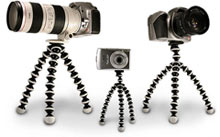
This is a very portable tripod and really works well. I got the heavy duty (SLR) model and it work great for video. For a larger camera I'd go with the SLR-Zoom model ($49)
The most interesting feature of the Gorilla Pod is that you can wrap the legs around things so you can actually stick your camera in some pretty strange places.
Check it out at Joby.com
Rachel Ray Video
Gorilla Pod Love at Flicker
Do you know somebody who would find this review useful?
Email it right to them.
|
AskMrVideo.com Forum Highlights
Every member has complete access to the AMV discussion forum, which is constantly being accessed by members sharing information, knowledge, insight, and fun. With an active community that's growing daily, this is one heck of a valuable resource!
Here are some recent posts on the forums:
Posted Oct 05,2007 5:47 PM mcowdell
Anyone using a Teleprompter, if so what type and brand are good to buy.
Thanks
message Posted By
Posted Oct 06,2007 9:29 PM Perry
I use the Prompt software in the download section with a laptop.
Perry
message Posted By
Posted Oct 07,2007 6:25 PM tomson
http://www.make-digital.com/make/vol02/?pg=146
If you want to build it:
http://blip.tv/file/381312
Enjoy,
Tom
message Posted By
Posted Oct 08,2007 10:12 AM Hakim
I use "MSI Prompt" -- a software-based teleprompter from Quentin Brown. It costs about $50. The features are much better than the free programs I have seen; MSI Prompt does what the expensive systems do, for a fraction of the cost.
There is a video demo and a download tryout available here:
MSI Prompt Professional: http://quickpaypro.com/x.php?3754_A89407_20623.
Hakim Chishti
Join the discussion today!
CLICK HERE TO JOIN NOW!
|
Closing Thoughts
Member Feedback: Some of the best ideas, tips and thoughts come from other AMV members just like you! So if you have something you'd like to share with the rest of us, please don't hesitate to send me a message.
Click Here for Membership Information!
Posted Oct 07,2007 1:25 PM DougF
Hey Perry,
Not sure if this article might help others but it did help me:
http://www.adobe.com/devnet/flash/articles/flv_download.html
Best,
doug
------
That's all for this edition. See you online!
Perry Lawrence
"Mr Video"
http://www.AskMrVideo.com
|
|
| The AskMrVideo.com Website uses 128-Bit Secure Socket Layer (SSL) encryption to transmit your personal information to our secure servers. Still not sure you want to do this over the internet? Well, just give me a call at 800-531-5718. |
|