|
November 13th, 2007
Dear Videographer,
This "White Album" edition of the tip of the week shows you how, with household items, to create a seamless white background that is very versatile.
I have a fortune in video equipment - cameras, computers, lights, microphones. Sometimes it's just a PAIN to set everything up. Especially if you don't have a dedicated video space.
I put this short video together to show you how - using household items - you can get a great video effect using your web cam. That's it - a web cam and 2 lights.
Found Video of the Week
Every week I bring you a new video that illustrates great video, great marketing or both. Enjoy!
Mr Video - White Background Edition!
Please upgrade to the latest version of Flash
Mr Video says "This is not the norm for the Found Video section but I just had to show you how easy it is to get going with video. Even for pros, sometimes we just want to shoot and post. This technique makes it very easy."
|
"The 70% Solution"
by Perry Lawrence
Do you have video on your web site yet? Lots of members are putting up some great videos. Video intros, transparent flash videos, video faqs - all kinds of videos.
So what's stopping you? Maybe you have tried but it was difficult. Maybe you have said to yourself "I need a better camera"" or "I need a new mic".
Well, whatever it is you are waiting for, let me give you some encouragement. It doesn't have to be perfect!
If you strive for perfection you will be striving for a long time without anything to show for it. If you work on getting it to 70% and then out the door, guess what! You will be way ahead of most of the people on the Internet.
Take my video above for example - it's not perfect. Not by a LONG shot. But it is a great tip, and one that people can use. That's all I need it to be. Now I could have worked all day on going into a studio, fixing my hair, and making sure the lighting was "just right" and given a different tip. But I wanted to show how, with a web cam and 2 lights, you can put video on your web site.
The web is dynamic. Things change. If you work on getting something perfect, the technology will change before you got it "right". So get it 70% right and move on. Tweak as you go and work on your technique.
Now I'm not advocating quantity over quality. I'm advocating getting it DONE vs. not getting it done. Like the comedian says, just"git 'er done!"
I got this tip from my friend Sean D' Souza from New Zealand. I video taped his seminar last spring and I picked up some great tips. Sean runs 5000bc.com and psychotactics.com - check them out.
Now go get some video on your site!
Did you like this article?
Emailing it to a friend is easy. Just click below!
|
Video Gear Review
Here we go! My favorite part of every "Tip of the Week". This is where we get to look at some neat toys tools!
Quickcam Deluxe for Notebooks
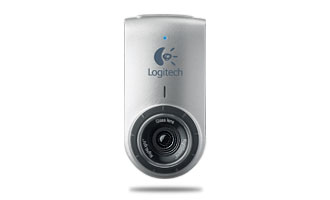 Do you need an expensive camera to start shooting video? The answer is NO! Do you need an expensive camera to start shooting video? The answer is NO!
Logitech webcameras are simple marvels. The technology is outstanding and the quality is great. Take this little web cam - designed for laptops. It's small, it works and it is priced right.
This particular model is manually focused, but everything else is automatic including Face Tracking. Turn it on in the software and your face stays front and center!
Additionally, this camera and software have "RightLight" technology to give you the best exposure as well as a built in microphone. Will this camera make you the next great director? Well, it'll get you started.
This "Deluxe" model is $59.99. The next one up is $99.99 (MSRP) and has Carl Zeiss optics, auto focus, can shoot in HD and has an ultra wide lens and in addition to being able to clip on to your screen, has a cool stand that you can use to get the right height when reading from your teleprompter!
Check it out at http://www.logitech.com
Do you know somebody who would find this review useful?
Email it right to them.
|
AskMrVideo.com Forum Highlights
Every member has complete access to the AMV discussion forum, which is constantly being accessed by members sharing information, knowledge, insight, and fun. With an active community that's growing daily, this is one heck of a valuable resource!
Posted Nov 12,2007 2:43 PM sfdeaton
Perry,
I made a quick video using Camtasia and uploaded it to a temporary web page. I am using it to give people an idea of what my upcoming membership web site will have to offer.
The problem is I think it takes too long to load. The video is only 3:30 long. Can the file size be reduced while maintaining quality?
Here is the web page:
http://www.plainfaith.net/childrensvideo.html
I have searched this site, but can't seem to find the answer.
Thanks for your help.
Steven
Posted Nov 12,2007 3:22 PM Perry
Steven, loads fast for me. 16MB for a 3 minute presentation is good. You can try reducing the frame rate and compressing the file more.
My friends over at ScreenCastCentral have a great tutorial on how to do this using Camtasia v5!
http://www.screencastcentral.com/public/567.cfm
Perry
Posted Nov 12,2007 3:32 PM sfdeaton
Thanks Perry.
I really appreciate your personal attention on this site.
Steven
Posted Nov 13,2007 12:00 AM rvchuck1
You may also want to reduce the physical size of the player to maybe 400x300 or 500x375. Maybe end up at 3-4mb per minute?
Loaded and started fine for me but hung up a little while playing.
Join the discussion today!
CLICK HERE TO JOIN NOW!
|
Closing Thoughts
Member Feedback: Some of the best ideas, tips and thoughts come from other AMV members just like you! So if you have something you'd like to share with the rest of us, please don't hesitate to send me a message.
Click Here for Membership Information!
Via Email:
HI,
I really am enjoying your web site. I have learned so much already.
Jenie Lahmann
President, InSites Design
2914 Stoneleigh Drive
Richmond, Indiana 47374
www.insitesdesign.com
------
Thanks Jenie! See you online!

Perry Lawrence
"Mr Video"
http://www.AskMrVideo.com
|
|
| The AskMrVideo.com Website uses 128-Bit Secure Socket Layer (SSL) encryption to transmit your personal information to our secure servers. Still not sure you want to do this over the internet? Well, just give me a call at 800-531-5718. |
|